
Building Agents That Build Themselves
Full code walkthrough: agents that iterate on their own harnesses

Yesterday, I ran a workshop with Ivan Leo (ex-Manus) called “Building Your Own OpenClaw from Scratch” to show you how to build your own AI assistant from first principles. We covered:
How coding agents are really general-purpose computer use agents that happen to be great at writing code
Building the core agent loop with an LLM and tool calls
Context management, memory compaction, and progressive disclosure
How agents can write their own tools and hot-reload them on the fly (via a factory pattern)
Making the agent trigger actions automatically (send a Telegram message, log to a database, fire off an email) using hooks
Connecting the agent to Telegram via FastAPI
Sandboxing and production deployment with Modal
We wrote this blog post for those who don’t have 100 minutes to watch the entire workshop right now.
All the code from the workshop is available in the build-your-own-ai-assistant repo.
👉 These are also the kinds of things we cover in our Building AI Applications course. Our final cohort starts March 9. Here is a 25% discount code for readers. 👈
Defining the Agent: From Coding Tools to General Computer Use
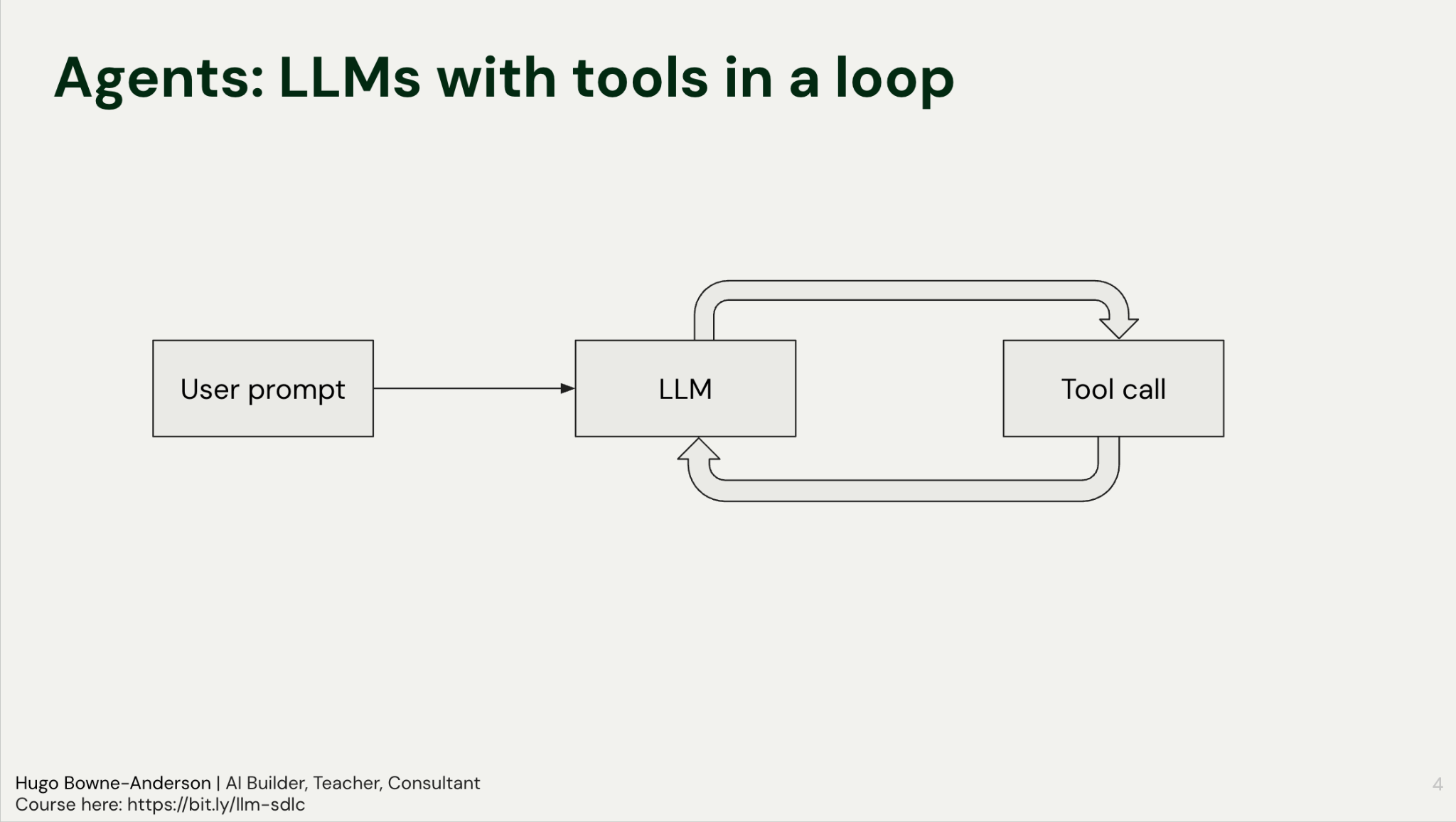
An agent is an LLM calling tools in a loop.
The agentic loop is as follows:
User Prompt: The input is sent to the LLM.
Tool Decision: The model decides to call a specific tool (e.g., read_file or search).
Execution: The tool runs and returns the result to the LLM.
Reasoning: The LLM analyzes the output to decide the next step, either another tool call or a final response.
This is the agentic loop. We gave two examples to make it concrete, a coding agent and a search agent.
A Coding Agent
When you ask a coding agent to edit a file, it doesn’t edit immediately. It first:
Calls the read tool to ingest the file (or sometimes the entire codebase)
Returns those contents to the LLM
Reasons about the current state
Then calls the edit tool to make changes
Each step is a turn through the loop: tool call, result, reasoning, next action.
A Search Agent
When you ask a search agent to compare two frameworks, for example, it can’t always answer in one shot. It:
Searches for framework X, returns the results to the LLM
Realizes it needs information about framework Y
Searches for framework Y, returns those results
Synthesizes both results into a comparison
The agent decides on each next step based on what it learned in the previous one: that’s the loop in action.
A note on agent harnesses: An agent harness is the scaffolding that wraps around an LLM to turn it into an agent. It handles the loop, tool execution, context management, safety guardrails, and state. Think of it this way: the LLM is the brain, the harness is everything else that lets it actually do things. We describe this in more detail in How To Build a General Purpose AI Agent in 131 lines of Python. This workshop is about building that harness from scratch.
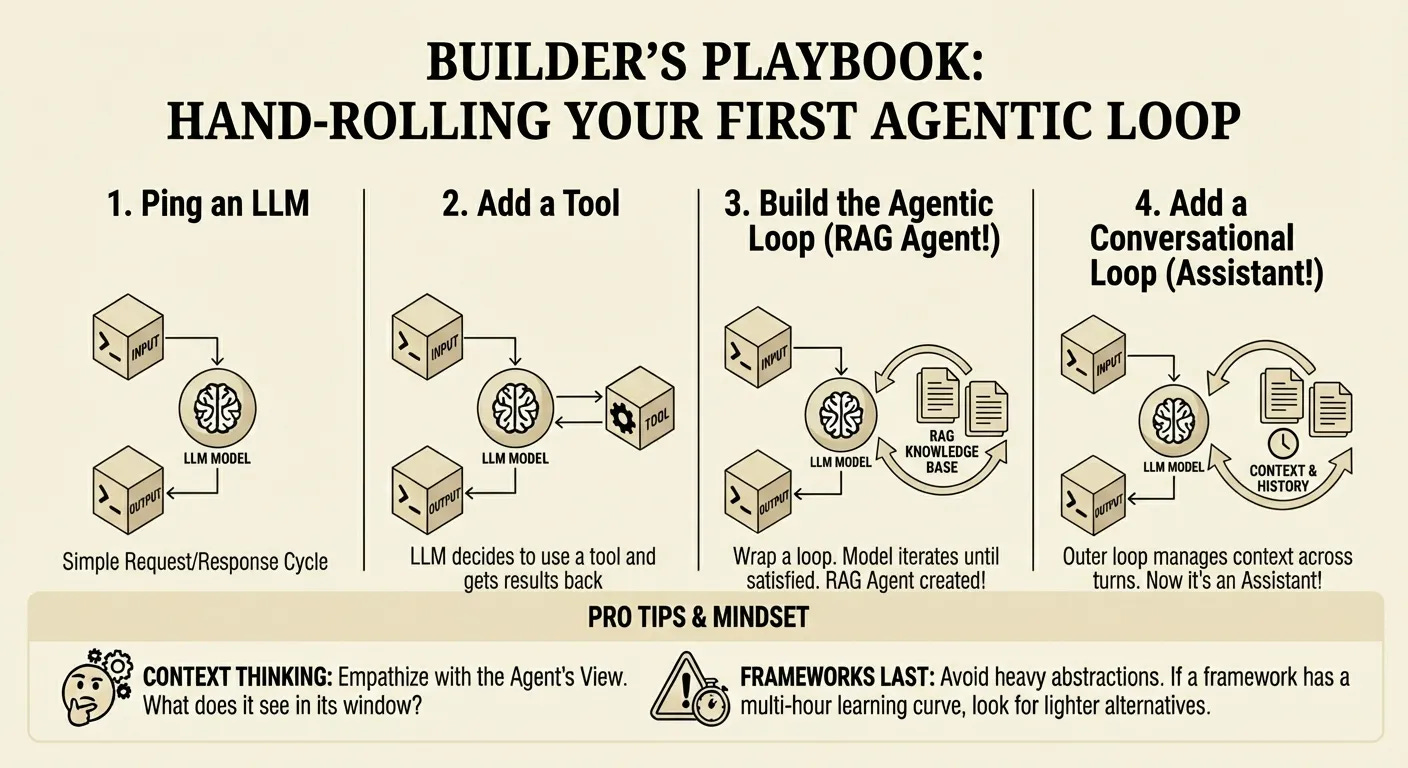
Coding Agents ARE General Purpose Computer Using Agents
We should stop referring to them as coding agents because they really are computer use agents that happen to be good at coding or great at writing code when you give them a bash tool. Timestamp: 08:22)
What’s more: A general-purpose agent can be built in 131 lines of Python using only four fundamental tools: read, write, edit, and bash.
Hugo demonstrates this with a local script. He asks the agent to clean up a messy desktop directory. The agent:
Lists the directory contents with ls
Identifies the file types and a logical folder structure
Executes shell commands to move files into that hierarchy
Interacts with the operating system exactly as a human developer would
It doesn’t write a script for the user to run: it runs the commands itself.
The Architecture: Pi and OpenClaw
The goal of the workshop was to help people understand and build MVPs of two popular and useful agents:
Pi: A minimal, extensible agent foundation. It uses the four core tools and operates on a philosophy of self-extension. If you want the agent to perform a task it currently cannot do, you ask the agent to write the tool for itself.
OpenClaw: OpenClaw builds on Pi and adds many features to it. A few key ones are:
Gateway: Manages sessions and connects to channels like Telegram.
Proactive Loop: Uses heartbeats and cron jobs to check emails, calendars, or alerts without user input.
Sub-agents: Delegated units for specific tasks.
Core Philosophy: Context, Capabilities, and Memory
In which we explore how memory and progressive disclosure make agents actually useful over time.
An agent’s effectiveness depends heavily on the underlying model. Running a legacy model like GPT-3.5 yields vastly different results compared to modern frontiers like Claude Opus or Gemini Pro. Once a capable model is in place, the architecture must solve for two specific requirements: context and capabilities.
When you’re building a task, you want to use the best models first. Cost is something you want to think about very far down the line, once you’ve confirmed that a frontier model can actually do the task.
Context is King
Context allows the agent to understand the user over time. As interactions increase, the model should reference past discussions, mistakes, and workflows. OpenClaw manages this through a specific memory architecture. It creates memory files for every day. When a conversation reaches a certain length, a compaction pattern triggers. This process summarizes the interaction and appends it to a timestamped Markdown file.
The model reads these files to understand the chronological history of the user’s work. While the agent retains access to raw database traces (JSON files), the timestamped summaries serve as the primary retrieval mechanism. This allows the agent to make informed decisions based on historical patterns rather than just immediate inputs.
If the model wants to figure out what we talked about during the conversation, it still has access to the raw database or the raw traces... But the real takeaway is just that it should have more context on you as you interact more and more with it... creating memory files for every day every time a compaction is reached.
No vector database and no embeddings: just append to a text file!
People are just so surprised that something simple like appending summaries to a markdown file timestamped. It works so well for memories and people like it so much. A lot of the love that OpenClaw has is just because the model can see the raw chats and the model can see the summaries.
Capabilities
Capabilities refer to the agent’s ability to extend itself. Following the Pi coding agent philosophy, the goal is “building software that builds software.” Developers can extend agents by adding skills, modifying system prompts, or integrating Model Context Protocols (MCPs). But agents can extend themselves also!
The distinction between context and capabilities defines the agent’s utility:
Context: The model has access to data sources, such as a calendar or past chat logs. It knows what has happened.
Capabilities: The model has the tools to act on that data. It knows how to execute tasks.
If an agent has access to a calendar (Context), it can see a user had late-night calls for three days straight. With the right instructions (Capabilities), it can proactively suggest sleeping in.
With better context, better system prompt, better prompts, better information, the models can do more for you. With capabilities, a lot of it is about extending it and making it easy for the model to either write its own tools or be able to get the information it needs.
But more tools doesn’t mean more capable. Progressive disclosure matters because models struggle when you dump everything on them at once.
You got to have a bit of empathy for the model. Imagine if someone gave you like 200 tools to choose from every time you had to make a decision. You wouldn’t even be able to finish reading all of the tools before you asked to give a response.
For the practical application of these principles, we used Gemini 3 Flash. While not as powerful as Opus, Flash is fast and cost-effective. Its speed makes interactions feel instant, reducing the immediate need for complex streaming architectures during the build process. The fundamental architecture remains a language model running in a loop with a managed token budget, extended via tool calling to interact with the environment.
The following sections cover building these components from scratch, starting with the base loop and moving toward memory compaction, factory patterns for tool creation, and deploying to sandboxed environments like Modal.
Implementing the Loop: Gemini, Pydantic, and Thought Signatures
In which we build the agentic loop from scratch, one API call at a time.
Remember that building an agent is building an LLM calling tools in a loop: you send a user prompt, the model decides to call a tool, you execute that tool, and you send the result back. This cycle continues until the model determines the task is complete or runs out of tokens.
At the core of this loop is the transition from regarding LLMs as smart autocomplete engines to reasoning agents that interact with their environment. By enforcing type contracts (essentially telling the model that calling a specific function requires a specific JSON payload) you enable the system to read files, execute bash commands, or query databases.
First, we declare a tool and make a single API call (workshop/1/agent.py):
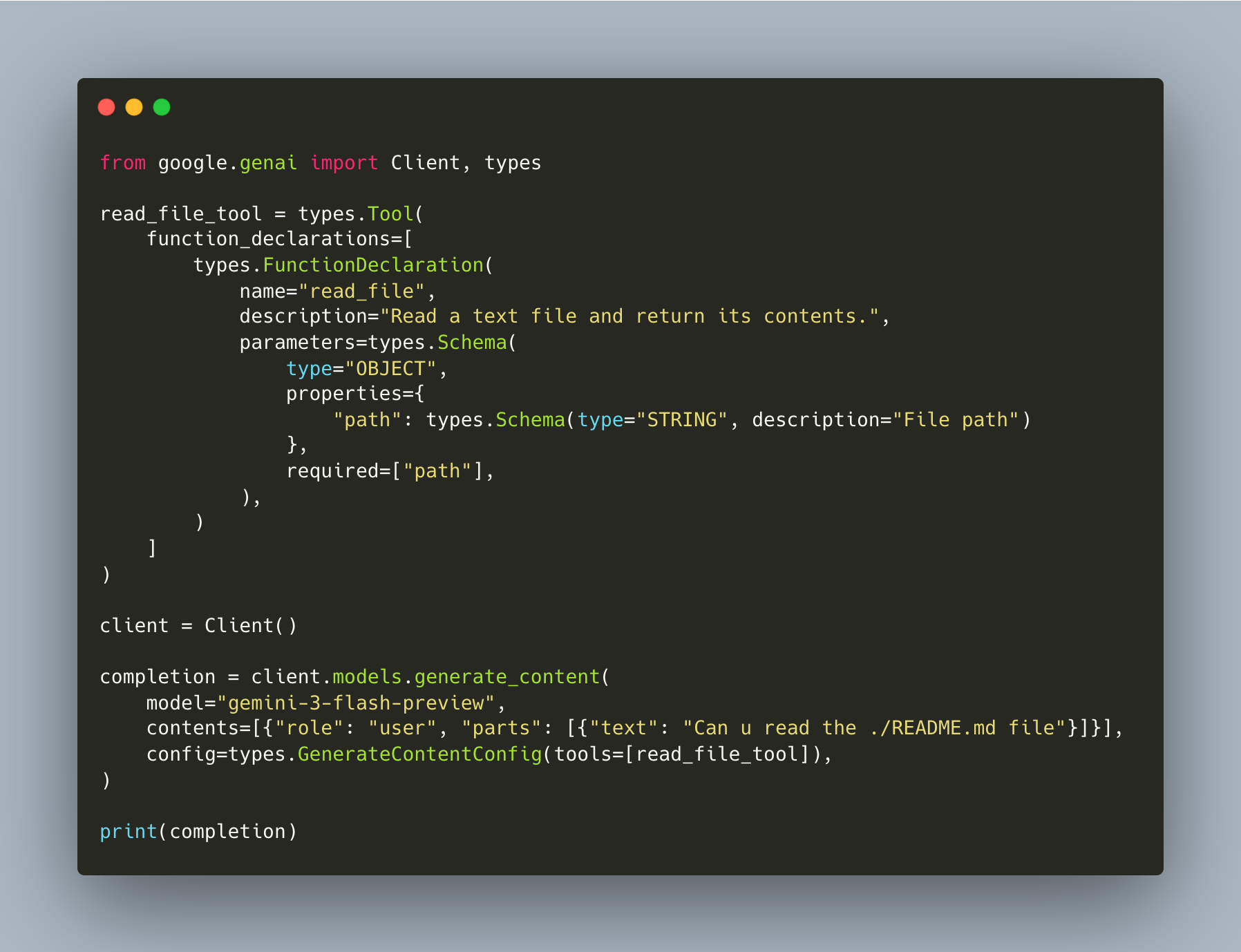
The model returns a function_call in its response (it wants to read the file) but nothing executes it yet. We just see the request.
Next, we add the actual function, execute the tool call, feed the result back, and call the model again (workshop/2/agent.py):
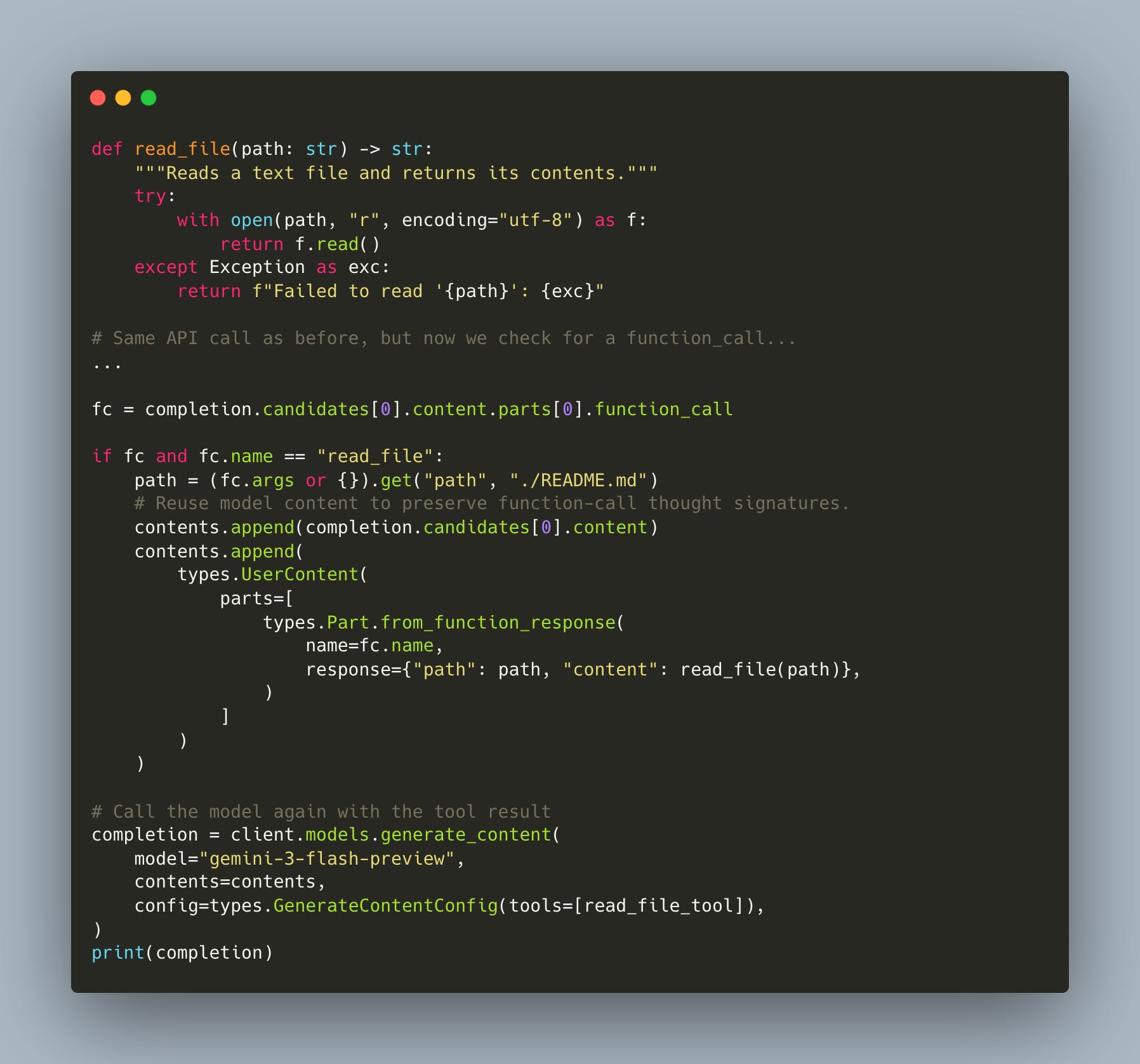
This is one manual round-trip: the model asks for a tool, we execute it, we send the result back. Notice the line contents.append(completion.candidates[0].content): that preserves the model’s thought signatures, which we’ll discuss next.
This is still hardcoded for a single round-trip. To make a real agent, we need a loop that keeps going until the model stops requesting tools (workshop/3/agent.py):
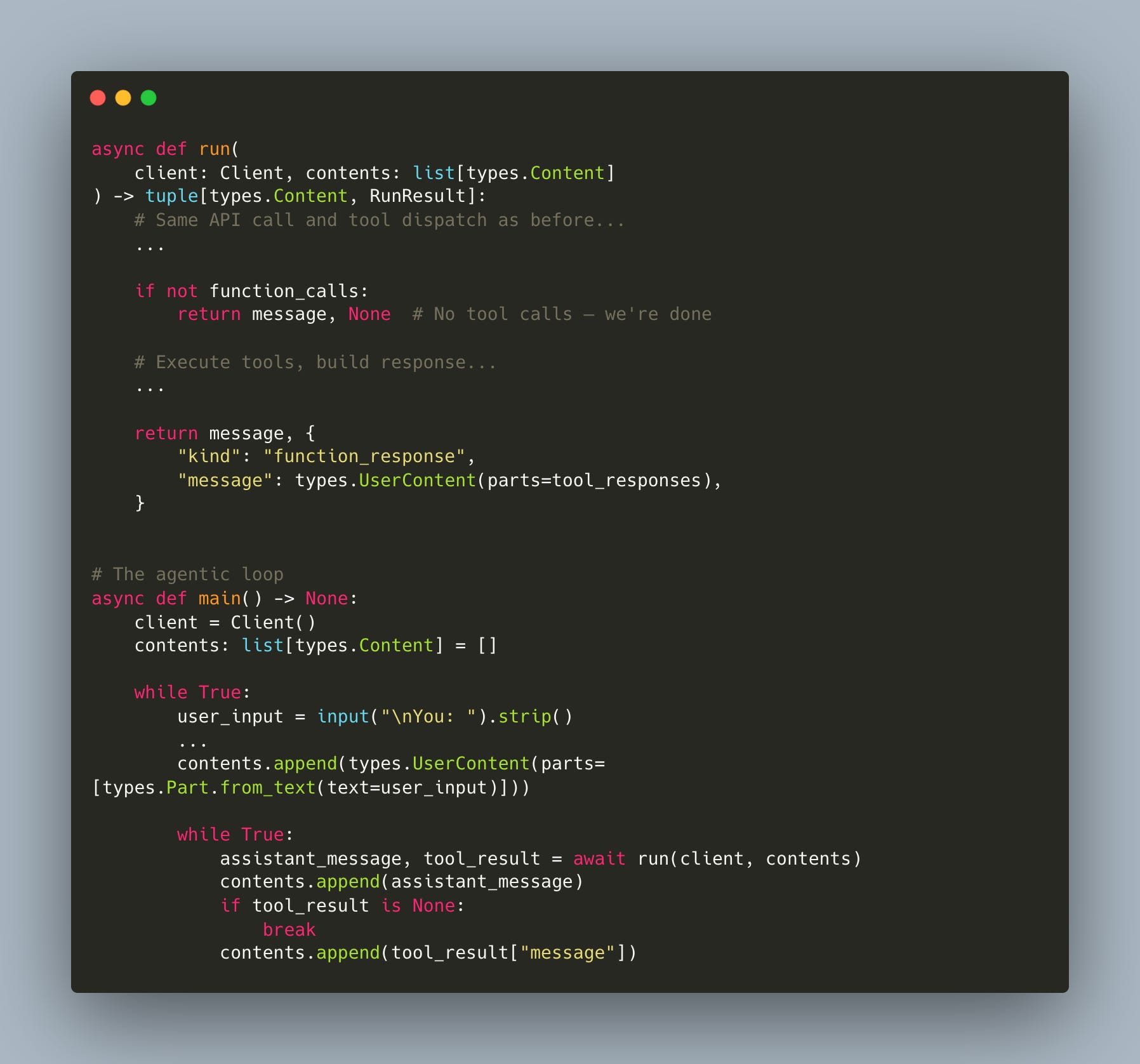
The run() function handles one model call: if the model returns a function call, execute it and return the result. If it returns text, return None.
The inner while True keeps calling run() until the model is done. This is the agentic loop.
Thought Signatures and Context Preservation
When implementing this loop with Gemini, handling the model’s internal reasoning (referred to as “thought signatures”) is critical for performance. Frontier models are trained on unrestricted chains of thought. When the model generates a response, it often includes these internal reasoning traces alongside the final output or tool call.
If you strip these signatures out when passing the conversation history back to the model for the next turn, you sever its train of thought. Preserving this metadata ensures the model retains the context of why it made a specific decision.
By preserving the thought signatures you can actually ensure that your model performance increases by like 5 to 10%. That’s the case with the Gemini 3 series of models... for a lot of these frontier models when the models are trained they’re trained based off their unrestricted chain of thought.
The Factory Pattern: Refactoring for Extensibility
It’s incredible how straightforward it is to allow an agent to write its own tools.
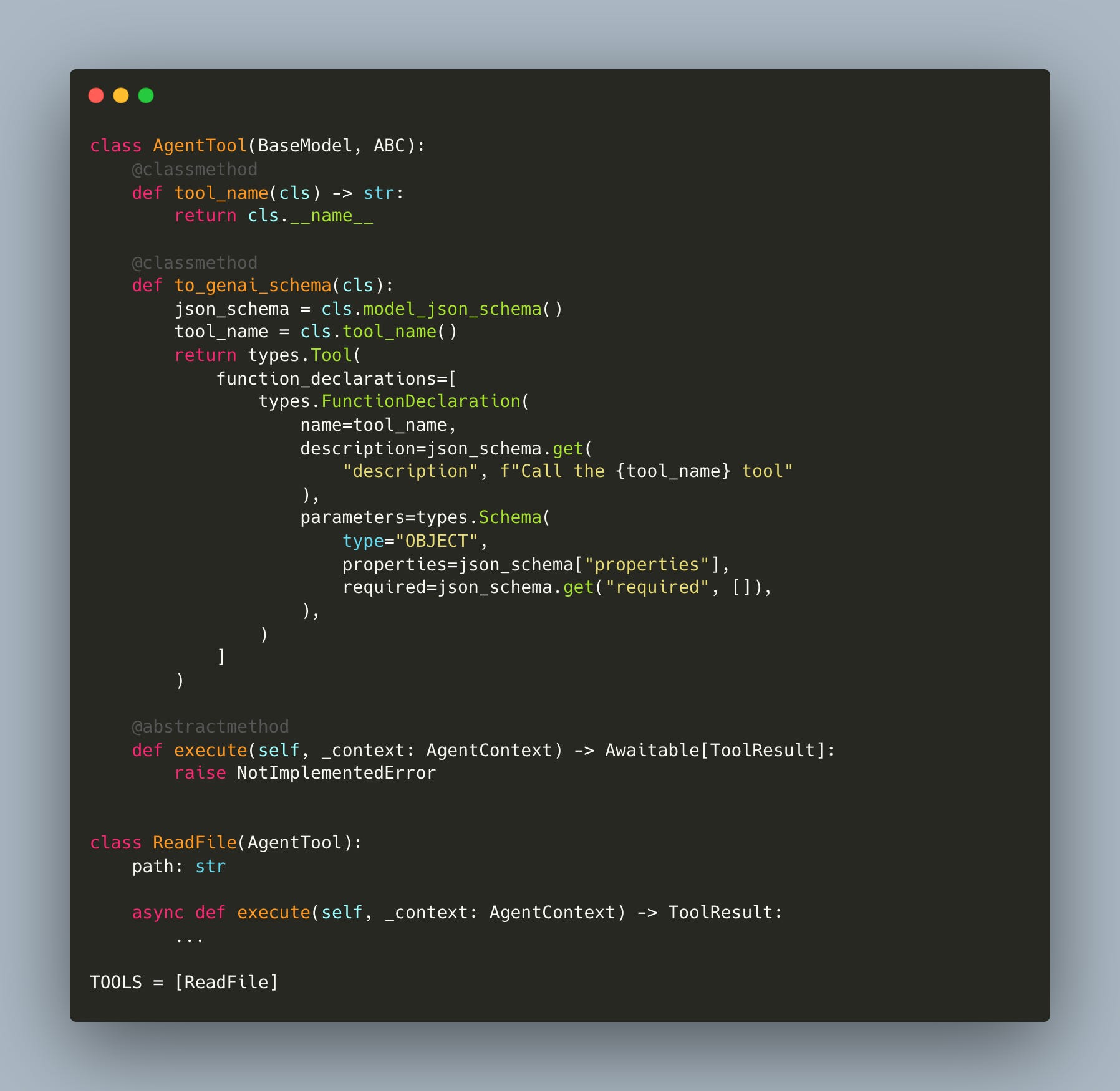
We refactored our agent so that tools are just classes. Each tool inherits from a base class, defines its parameters, and implements an execute method. The runtime uses Pydantic to automatically generate the function calling schemas from type hints. Because execution is separate from the schema, you can test each tool independently without invoking the LLM (workshop/4/agent_tools.py):
The AgentRuntime dispatches by name and validates args via Pydantic: it doesn’t know about specific tools (workshop/4/agent.py):
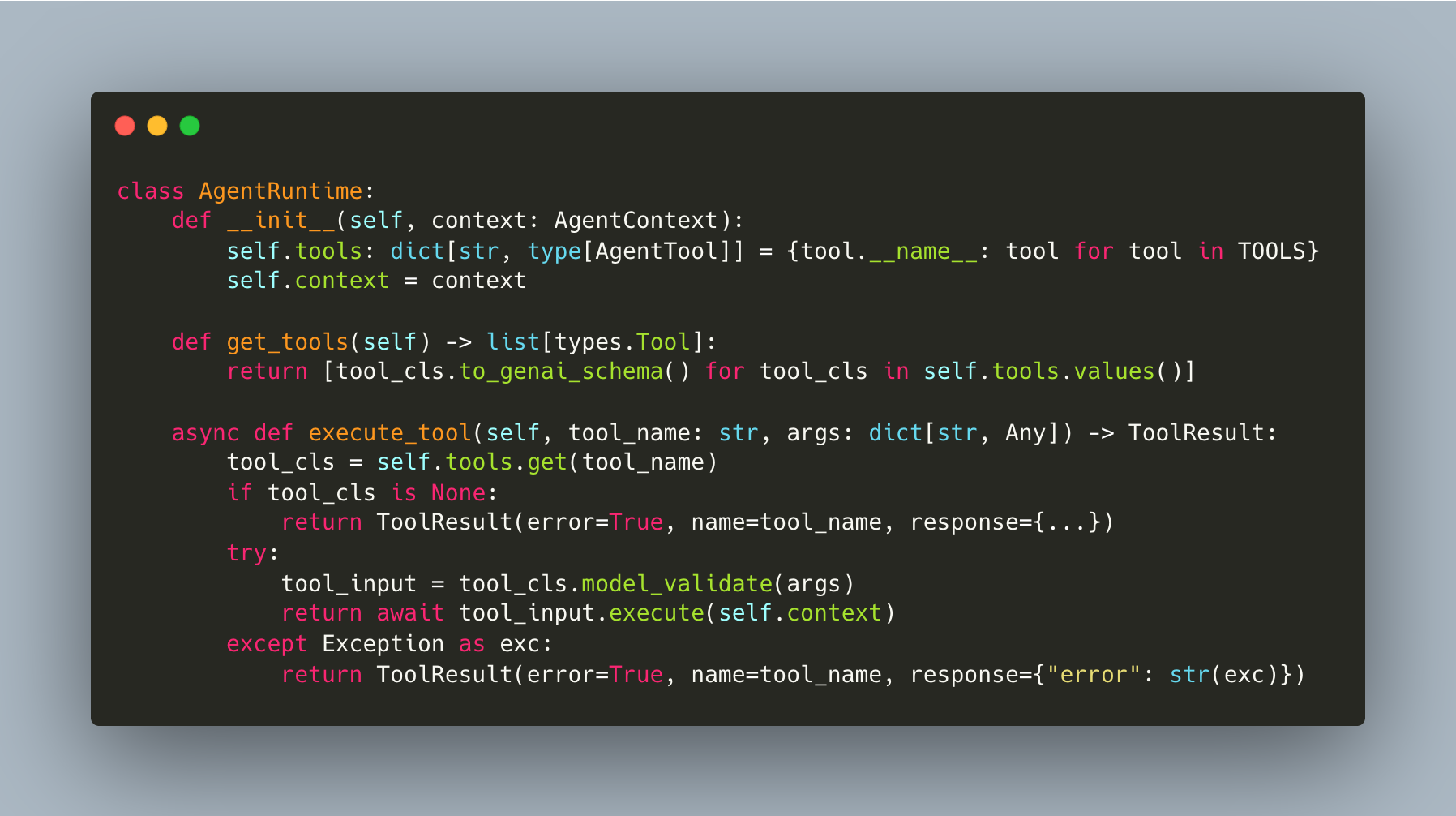
Adding a new tool means adding a class to agent_tools.py and appending it to TOOLS. The runtime and the agent loop don’t change at all. This is what makes self-writing tools possible: the pattern is so simple that the agent can read the tools file, see the pattern, and write new tool classes itself.
All you need to do to implement a new tool is define the parameters you want. These are automatically converted into a schema. Define an execute function. And the beauty of this is that you can actually test and validate your execute function independently of your model being called.
Once tools have their own execute methods, you also want to make them async from day one:
It’s much more useful to start with an async runtime... when you’re interfacing with like databases, logging, etc. A lot of these are written and implemented as async functions. And so if you don’t have async functionality built in from the beginning, it’s a bit complicated down the line.
Software Building Software: Hot Reloading and Self-Modification
What’s amazing is the agent can modify its own harness!
When you give the agent access to the source code of its own tools, it can read the patterns, understand how tools are defined, and write new ones for itself. This is a new paradigm of software building software, and the factory pattern we just set up is what makes it possible. Standard Python runtimes load modules once, so if an agent writes a new tool, the server normally requires a restart. Hot reloading solves this.
The mechanism is straightforward: the runtime tracks the last_modified timestamp of the agent_tools.py file where tool classes are defined and before every inference step, specifically when get_tools or execute_tool is called, the system checks if this timestamp has changed (workshop/6/agent.py):
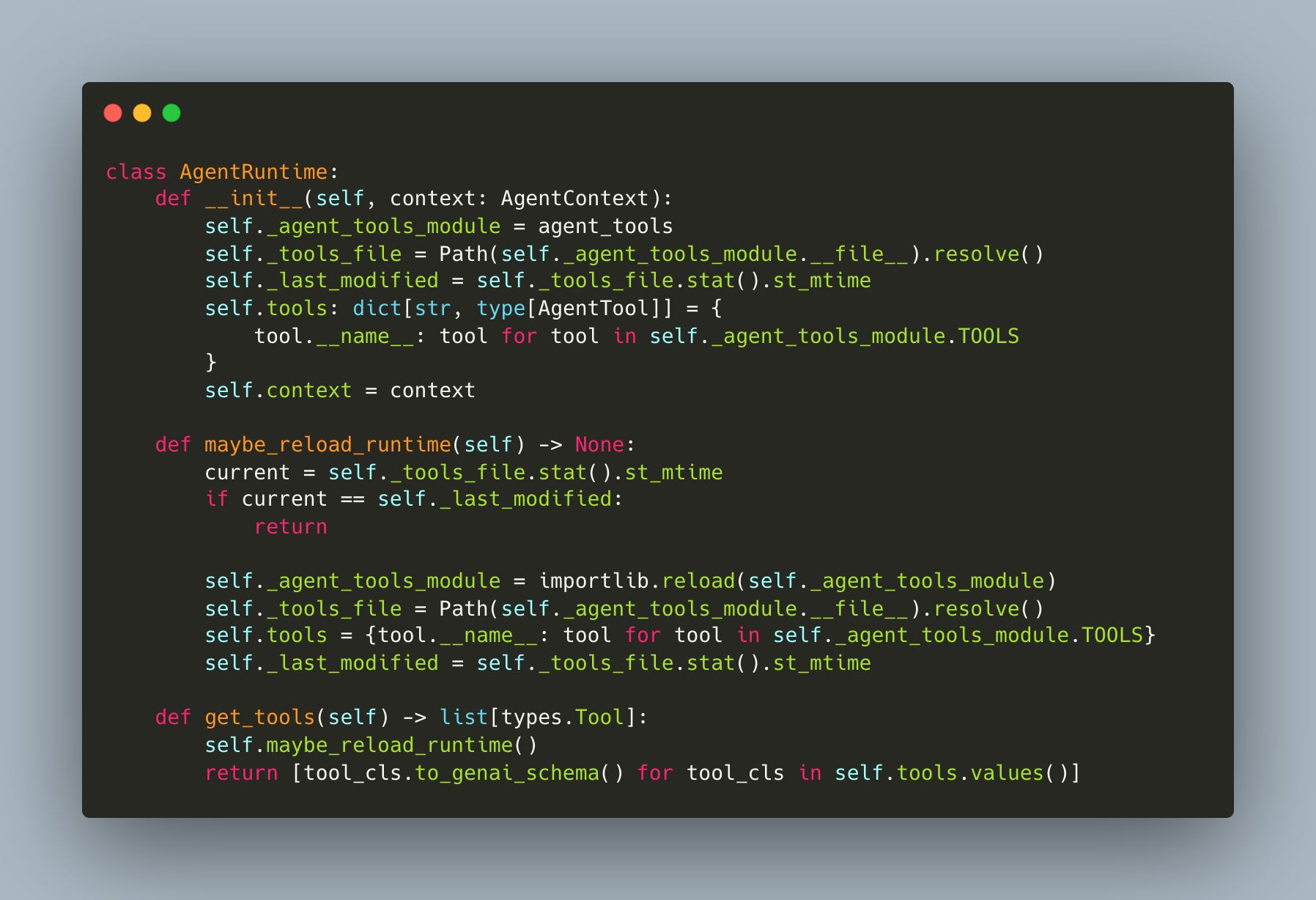
Because our tools are defined in another file we can just check to see when the file was last modified. We know that if there are any changes in that file, we can just reload the tools... All the tools are, they’re not like these concrete things. They’re just definitions.
Here’s what the self-modifying loop looks like in practice:
Instruction: You ask the agent to create a specific utility, such as a tool that generates text files with Notion-style timestamps.
Generation: The model reads the existing
agent_tools.py, matches the coding patterns, and appends a new class (e.g., NotionFileCreator) with the required arguments and execution logic.Detection: The runtime detects the file modification via the timestamp check.
Reload: The module is reloaded, and the new tool is registered in the tool registry.
Execution: In the very next step, the agent calls the tool it just wrote to complete the user’s request.
This approach transforms the agent from a static system into one that builds its own infrastructure. In the workshop, we demonstrated this in both directions: the agent created the Notion-style tool and immediately used it, but it also deleted its own bash tool from the code. The runtime detected the change and the tool vanished from the registry.
This is the idea behind software that builds software... at the end of the day when you have these very composable building blocks that’s what makes this possible.
By abstracting tool definitions away from the execution logic and wrapping them in a reloadable runtime, you create a system where the capability gap is bridged by the agent itself.
Hooks: How To Trigger Events
When the agent responds or calls a tool, we often want to trigger other things: send a Telegram message, log to an observability platform like Logfire, render pretty output in the terminal.
When you build a simple loop, it’s tempting to place print() statements directly where the action happens. But if you need to save to a database, log, and update a user interface simultaneously, your execution logic becomes cluttered. Hooks solve this by intercepting specific moments in the agent’s lifecycle.
Every single bit of additional functionality you want to add is being added to the execution logic itself. And so that ends up being very difficult to maintain... a really nice abstraction is the idea of hooks where at different parts of the life cycle of the model... we may be able to intercept it.
Ivan demonstrates an architecture that tracks three distinct lifecycle events (workshop/7/agent.py):
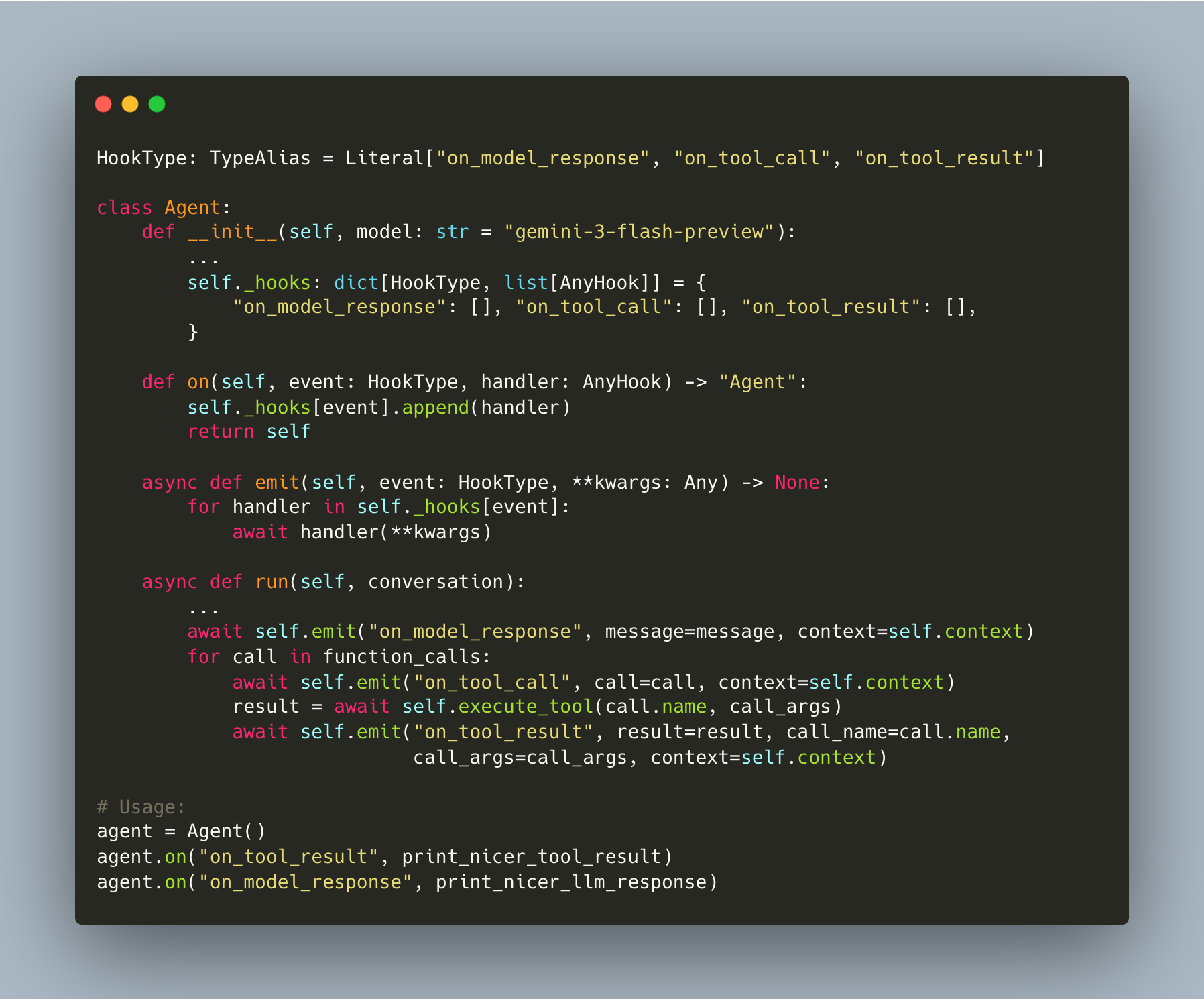
The run function no longer prints directly. Instead, it calls emit which triggers all async handlers registered for that event. The agent focuses on reasoning and execution, while the hooks handle side effects.
This separation enables “pretty” outputs. By registering a distinct handler using the Rich library, the console output transforms from raw text into structured visual data. Markdown renders properly, code blocks gain syntax highlighting, and file edits appear as visual diffs.
You notice that our core agent logic hasn’t changed... What’s changed over here is the core rendering logic. And by hooking this up into hooks... and telling the model like hey, when you get when you call a tool, I want you to execute this function... this is a very composable way to think about agents.
Because the logic is decoupled, you can stack multiple handlers on a single hook. The same event that prints a pretty diff to your terminal can asynchronously log the change to a database or forward the message to a chat interface. This composability is essential for moving from a script to a production-grade application.
“ET Phone Home”: Connecting to Telegram via FastAPI
In which we connect the agent to Telegram without changing a single line of the agent or its tools.
Up to this point, the agent ran entirely in the terminal. To make it useful from a cafe or mobile device, we moved from a local CLI to a FastAPI server running on Uvicorn, allowing the system to accept incoming HTTP requests from Telegram.
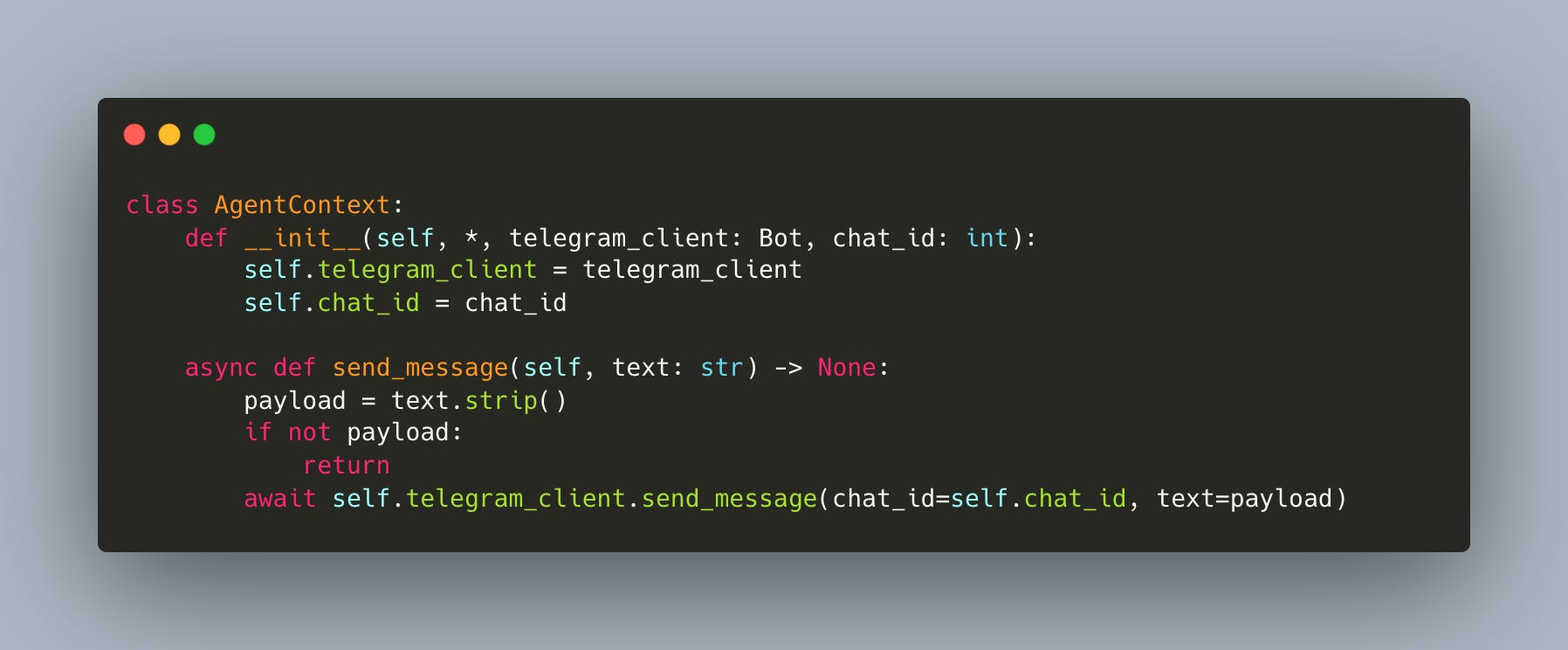
Connecting the agent to Telegram does not require rewriting the core loop or the tool definitions. Instead, the implementation leverages the hook system built in the previous section. By treating the Telegram client as a side effect of the agent’s lifecycle, the core logic remains agnostic to the interface. The transition from a CLI app to a remote bot involves three specific changes:
First, the AgentContext gets a Telegram client (workshop/9/agent_tools.py):
Then the webhook handler creates the context and registers hooks and that’s it (workshop/9/telegram_server.py):
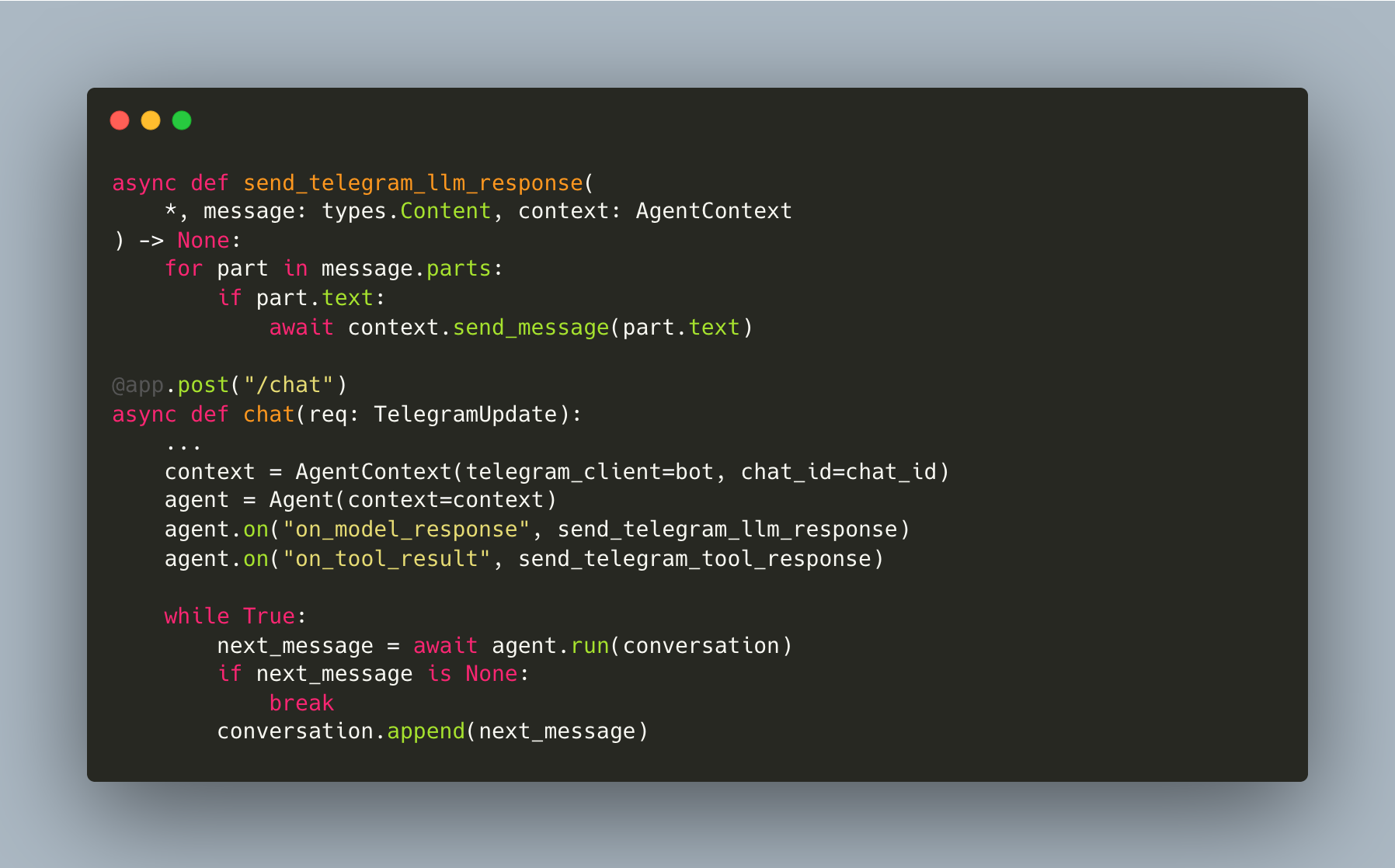
Zero changes to the Agent class and zero changes to the tools: the hooks architecture pays for itself here!
Literally all we had to do in order to get let’s say this telegram bot working wasn’t to do any function complex functionality all we had to do was just to define finally on to result and on model response telegram hooks... everything works out of the box as you originally did with a simple and extensible architecture that works because you have very good primitives. (Timestamp: 1:22:18)
This approach demonstrates the composability of the agent framework:
The server acts as a receiving endpoint that queues messages,
A worker process pulls messages from the queue,
The worker initializes the agent with the correct context, and
Then executes the run loop.
Because the rendering logic is abstracted into hooks, the agent retains all previous capabilities, including logging and debugging, while simultaneously broadcasting to a new medium. The Telegram interface becomes just another “view” over the same underlying logic.
By abstracting out what is essentially the command line application, all the rendering logic, the input logic... into a FastAPI framework and now a server that we hosted on, you can start to see by making your software very composable this ends up being a very good investment for you down the line. (Timestamp: 1:23:08)
Sandboxing and Production Patterns (Modal & Queues)
In which we make it safe to let an agent write and run its own code.
Moving an agent from a local command-line interface to a production environment requires separating the communication layer from the execution logic. The architecture shifts from a simple while loop to a server-worker pattern using FastAPI. The server acts as an entry point, accepting webhooks (in this case, from Telegram) and pushing events into a queue keyed by the user’s Chat ID.
This decoupling allows the heavy lifting to happen asynchronously. A worker process polls the queue, retrieves the message, and triggers the agent’s logic. This structure supports horizontal scaling, where each conversation runs in an isolated environment.
You have a server that receives telegram messages and then for every single telegram message we have we put it in a queue that has a chat ID... The beauty of something like this is that you can actually have as many workers as you have chats. So, every single chat can have its own sandbox worker.
Sandboxing is critical for agents capable of writing and executing code. Running generated scripts on a local machine or a shared server exposes the host to security risks and resource contention. Modal offers a solution by wrapping the worker in a secure, isolated container.
A specific feature of Modal, experimental snapshots, improves the efficiency of these sandboxes. Rather than cold-booting a container for every interaction, the system takes a snapshot of the runtime, including memory and dependencies.
State Persistence: The sandbox pauses exactly where it left off, similar to suspending a virtual machine.
Latency: Resuming from a snapshot takes seconds, making the user experience feel real-time despite the heavy infrastructure.
You’re able to snapshot the entire current runtime of the sandbox and also the dependencies. So it’s kind of like a VM, but you can just suspend it whenever you want.
The final piece is preventing runaway tool loops. The agent tracks how many events have occurred since the last real user message. When the budget is exceeded, tools are removed entirely from the API call and a guardrail instruction is injected (workshop/12/agent.py):
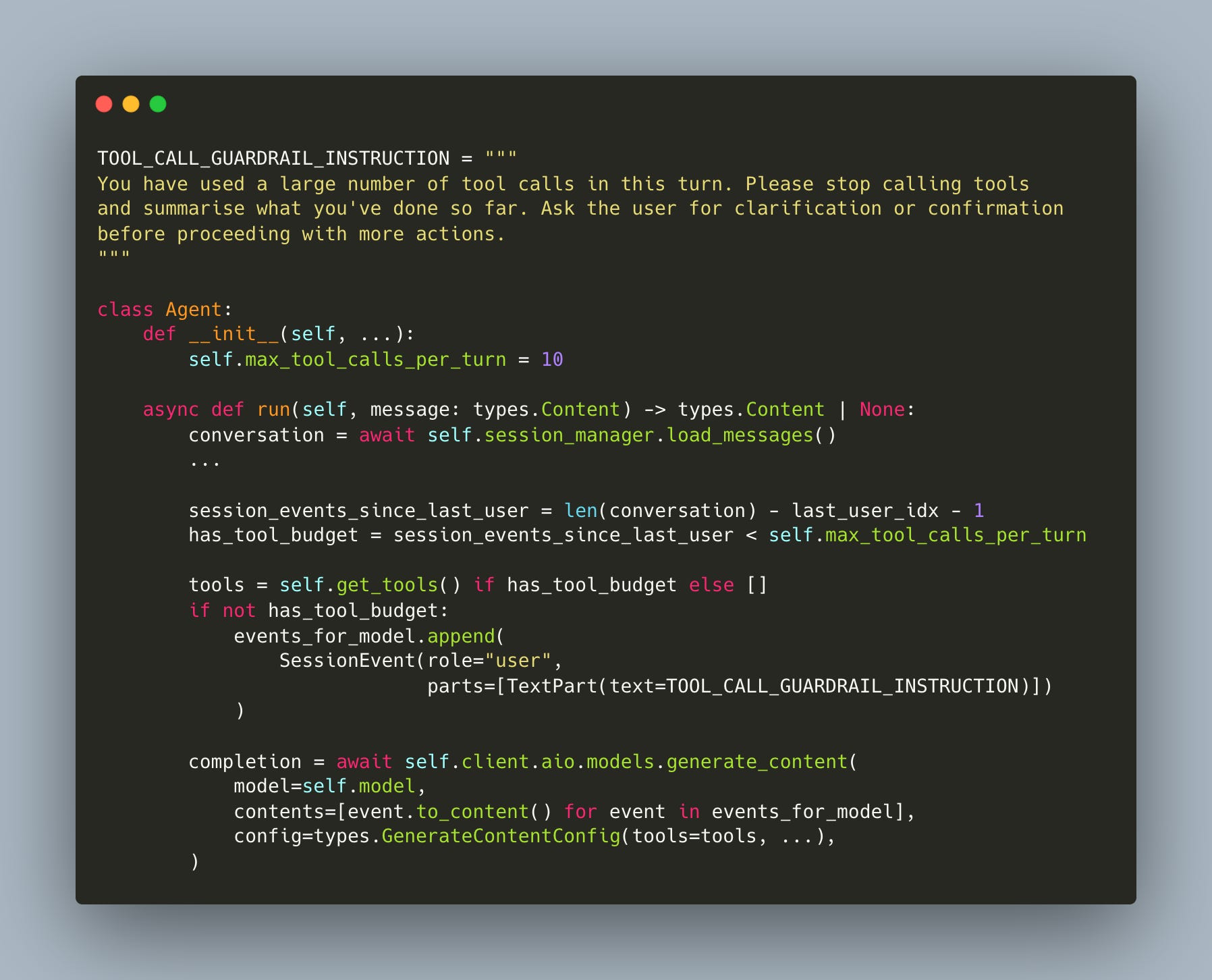
When the budget runs out, the model is forced to stop and summarize rather than spiral into infinite tool calls.
Takeaways
Coding agents are computer-use agents. Your coding agent is already a general-purpose computer use agent. Give it read, write, edit, and bash, and it can do anything you can do in a terminal.
Make tools just classes, and the agent can write its own. The factory pattern is simple, but the payoff is huge: the agent reads the file, matches the pattern, and extends itself. Software building software. Make the execute methods async from the start, since real-world agents spend most of their time waiting on network calls.
Hooks keep your agent composable. When something happens in the loop, you want to trigger things: Telegram messages, logging, pretty terminal output. Hooks let you add all of that without touching the core logic.
Memory makes your agent better over time. Daily compaction summarizes interactions into timestamped markdown files, so the agent builds long-term context without blowing up the context window.
Sandbox your agent in production. Agents that write and execute code need isolated environments. Modal lets you spin up ephemeral workers per conversation, snapshot the runtime between messages, and keep your host machine safe.
Thanks for reading!
👉 These are also the kinds of things we cover in our Building AI Applications course. Our final cohort starts March 9. Here is a 25% discount code for readers. 👈
The 'LLM calling tools in a loop' definition is the one that actually sticks, and the memory-via-timestamped-markdown approach is genuinely underrated - I've run 1000+ agent sessions using almost exactly this pattern without fancy vector stores. The key discovery along the way: what goes in CLAUDE.md matters far more than how long it is.
Behavioral rules and structural context compound across sessions in ways that are hard to anticipate until you've run enough of them. If you're thinking about instruction architecture for agents like these, I wrote up what I learned: https://thoughts.jock.pl/p/how-i-structure-claude-md-after-1000-sessions